
Those sponsored posts in your Facebook feed? The ads between Instagram Stories? They’re all part of something bigger — Meta ads.
Every second, millions of businesses compete for attention across Facebook, Instagram, WhatsApp, and Messenger. Some fail miserably. Others turn $100 into $10,000. The difference isn’t luck.
If you’ve ever wondered why certain ads seem to follow you around or how small businesses suddenly appear everywhere online, you’re asking the right questions.
This guide pulls back the curtain on Meta’s advertising empire.
You’ll discover answers to questions like: What are Meta Ads? How do these ads actually work? Why are they so effective? And what makes them different from traditional advertising? Plus, I’ll reveal the strategies that separate successful Meta advertising campaigns from money pits.
Disclaimer: If you buy any products through links on this site, I may earn a commission. But it doesn't make any difference to your cost, and it helps me keep this blog running. So you could always read my articles for free.
What are Meta Ads?
Meta ads are paid advertisements that appear across Meta’s family of apps – primarily Facebook and Instagram, but also Messenger and the Meta Audience Network.
When you create a Meta ad, you’re tapping into a massive advertising platform that reaches over 3 billion users worldwide.
You set up campaigns through Meta Ads Manager, where you choose your advertising goals – whether that’s getting more website visitors, app downloads, or sales.

The platform then lets you target specific audiences based on demographics, interests, behaviors, and even past interactions with your business.
An important aspect that you can’t skip when exploring “What are Meta ads?” is the various ad formats. You can create different ad formats depending on your needs.
Image ads, video ads, carousel ads that showcase multiple products, collection ads for e-commerce, and story ads that appear between user stories.
And you know what makes Meta advertising particularly effective? The platform’s detailed analytics. You can track exactly how many people saw your ad, clicked on it, and took action.
This data helps you understand what’s working and adjust your strategy accordingly.
In short, Meta ads are a powerful way to reach potential customers where they already spend time online, with precise targeting and measurable results.
Why use Meta Advertising?
You’re considering Meta ads for your business, but why pick this platform over others? Now that you know what are meta ads, let’s look at the practical reasons that make Meta ads worth considering for your marketing budget.
Massive reach meets precise targeting
First of all, Meta gives you access to billions of active users across Facebook and Instagram.
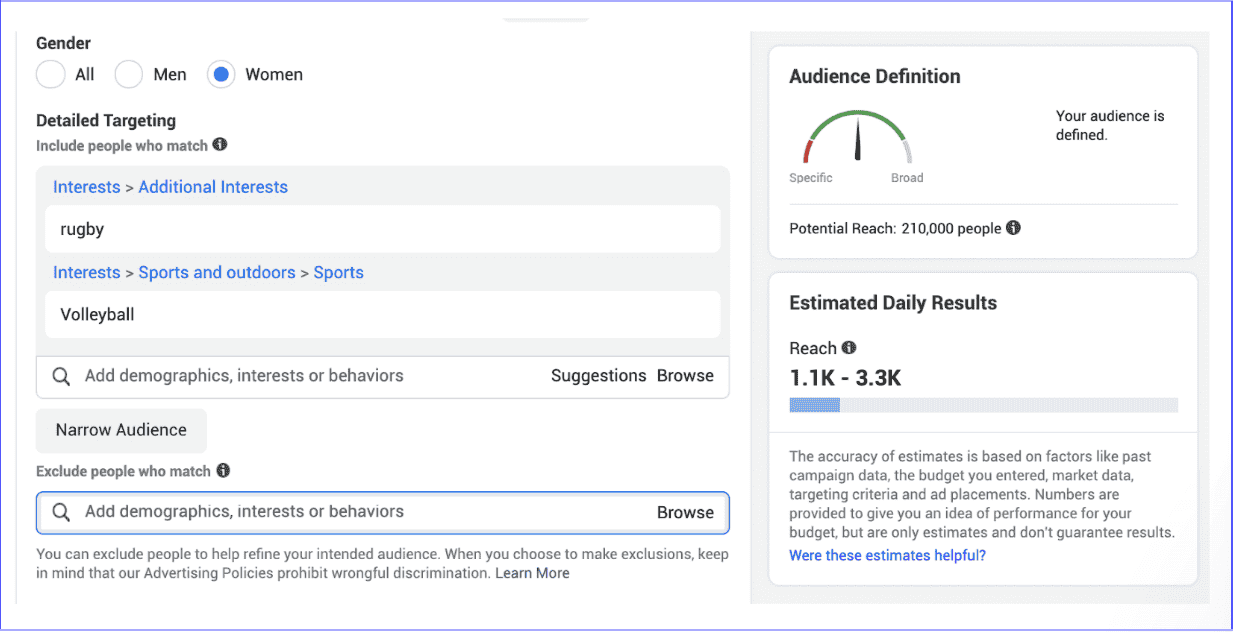
But here’s the deal – it’s not just about big numbers. With meta advertising, you can zero in on exactly who sees your ads based on age, location, interests, shopping behavior, and even life events like getting engaged or having a baby.
Budget flexibility that works for you
Flexibility is what Meta Ads are known for. You can even start with as little as $5 per day. You control how much you spend, and there’s no minimum contract period. Besides that, Meta’s bidding system means you only pay what’s necessary to reach your audience, not a penny more.
Real-time results you can actually use
You don’t have to wait weeks to see if your ads work. Meta shows you performance data immediately – who clicked, who bought, who signed up. And you know what? You can adjust your campaigns on the fly based on what you learn.
Multiple formats for different goals
Look, not every message fits in a single image. That’s why Meta offers various ad formats – videos for storytelling, carousels for showcasing products, instant experiences for immersive content. You pick what matches your message.
Overall, Meta advertising combines huge reach with precision targeting, flexible budgets, immediate feedback, and versatile formats.
How Meta Ads work?
From what you have learned about what are Meta ads, they might seem complicated. But they actually follow a straightforward process. Let’s walk through exactly how these ads work from start to finish, so you know what happens behind the scenes.
The auction system explained
Meta ads work through an auction system. When someone opens Facebook or Instagram, multiple advertisers compete to show their ads to that person.
This is through the bid amount they set when creating their ads. Then the ad is shown based on who wins the bid.
But wait – it’s not just about who pays the most. Meta considers three things: your bid (how much you’re willing to pay), estimated action rates (how likely people are to engage), and ad quality.
Setting up your campaign
First of all, you create a campaign in Ads Manager and pick an objective, like getting website traffic or generating leads.

Next, you define your audience. For example, you might target women aged 25-40 who live in Chicago and love yoga. After that, you set your Meta advertising budget and schedule. We’ll learn more about this process later in the guide.
How Meta delivers your ads
So what happens next? Meta’s algorithm takes over. It learns which people in your target audience are most likely to take the action you want.
The system then shows your ads to these people first. And you know what? It keeps learning and improving as your campaign runs.
The payment process
Knowing what Meta ads are is not enough; you also need to know about the payment process. You are charged only when someone takes action, like clicking your ad or viewing your video. Meta charges you based on the auction results, which means you might pay less than your maximum bid if there’s less competition.
Types of Meta Ads
When we discussed what are Meta Ads earlier, we didn’t go into all its types in detail. Meta offers a variety of ad formats to help businesses reach their goals. Let’s dive into each type, explore how they work, and figure out which ones might work best for your specific needs.
Image ads
Image ads are the simplest format you can use. You upload one compelling photo, add your text, and you’re ready to go. This type of Meta advertising appears in users’ feeds, Stories, and even in the right column on desktop.

For example, a local restaurant might use an image ad featuring their signature dish with text like “Try our award-winning pasta – reserve your table today.”
Image ads work best when you have one clear message and a strong visual. So, you need to make that single image count since you can’t show multiple products or angles.
Video ads
What if you need to show your product in action? Video ads let you do exactly that. You can create videos from 1 second to 240 minutes long, though most successful video ads run between 15-30 seconds.

Videos autoplay in feeds without sound, so you need to grab attention visually first. Nevertheless, when users tap for sound, that’s when you can really tell your story.
A fitness coach, for instance, might use this type of Meta advertising to show a quick workout routine with energizing music and captions for those watching without sound.
Carousel ads
Here’s where things get more flexible. Carousel ads let you showcase up to 10 images or videos in a single ad, and each card can have its own link.
So if you’re an online clothing store, you can display an entire outfit – shirt, pants, shoes, and accessories – with each item linking to its product page.
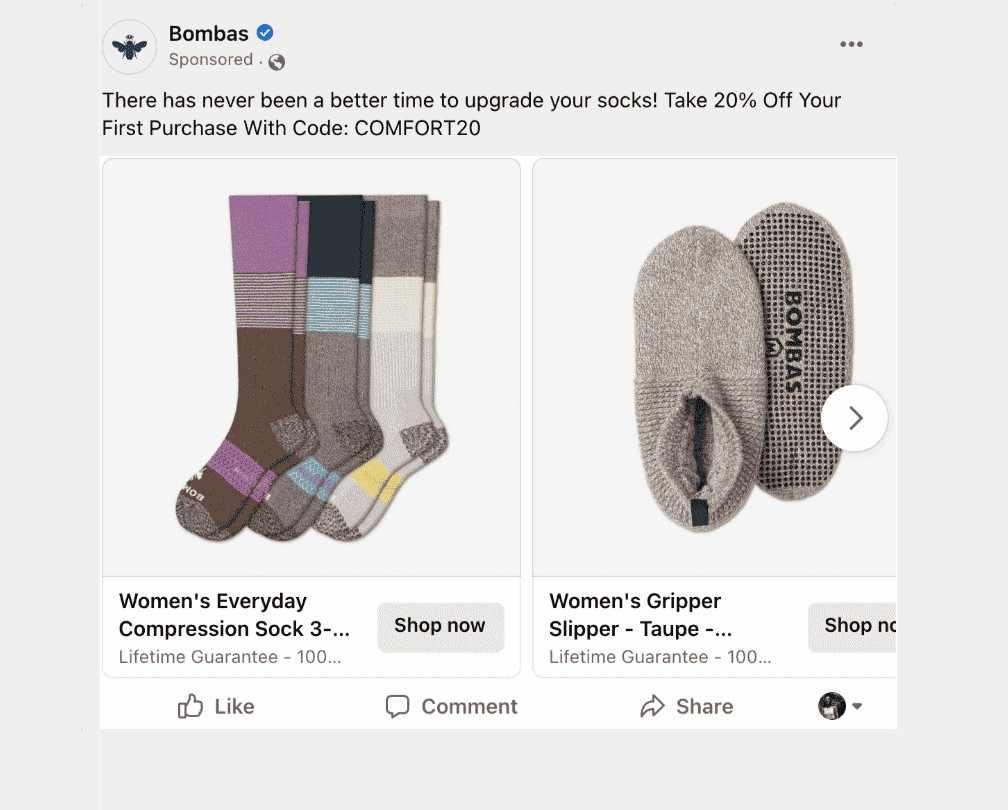
And you know what makes carousel ads particularly useful? People naturally swipe through content on social media, so this format feels familiar. Besides that, Meta’s algorithm can even automatically show your best-performing cards first.
Collection ads
Collection ads take shopping to the next level. They feature a primary video or image with four smaller product images below. When someone taps the ad, it opens into a full-screen experience called Instant Experience (formerly Canvas).

The result? Using these types of ads for Meta advertising allows customers to browse your products without leaving Facebook or Instagram. For what it’s worth, these ads load instantly and create an immersive shopping experience that typically leads to higher engagement rates.
Stories ads
Millions of people watch Stories every day on Instagram and Facebook. Stories ads appear between friends’ Stories and take up the entire screen. Since they’re vertical and full-screen, they feel native to the platform.
You can add interactive elements too – polls, questions, or swipe-up links (now called link stickers).
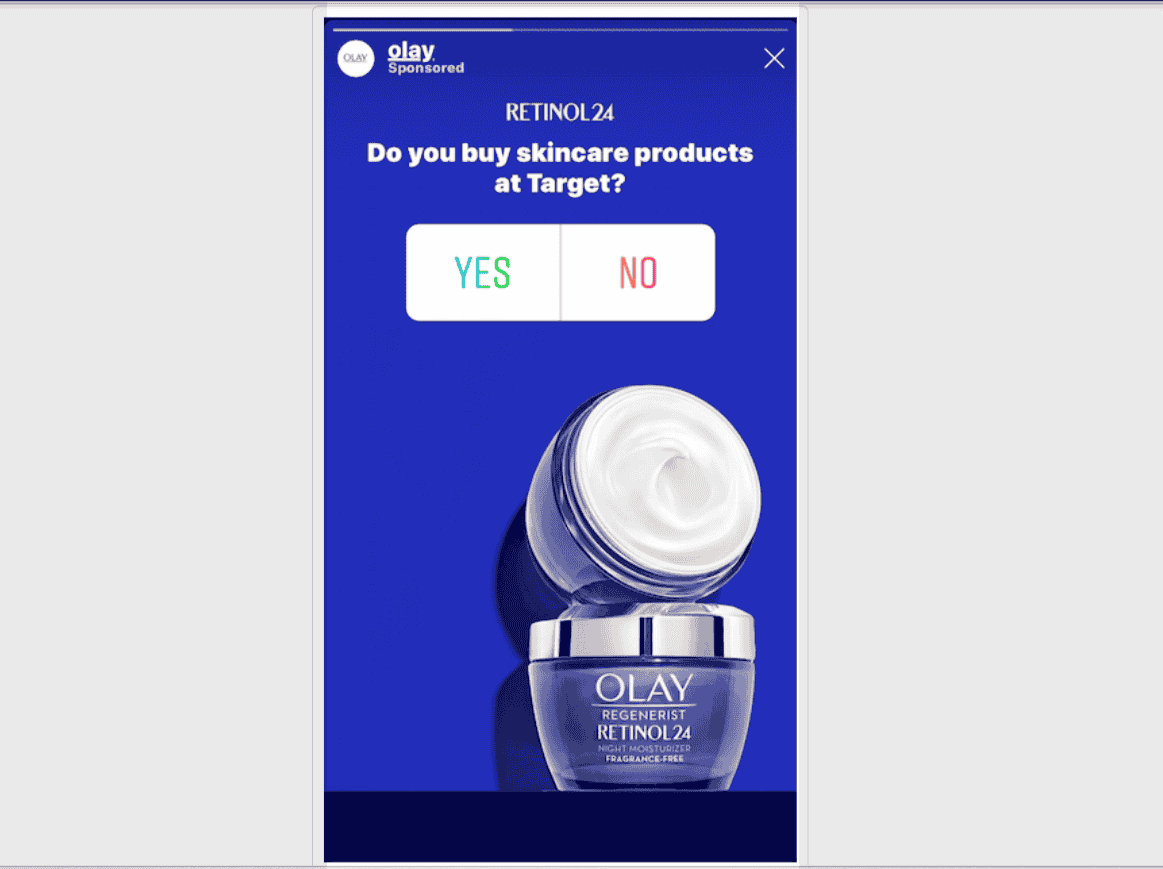
A travel agency might use a Stories ad with a poll asking “Beach or mountains?” to engage viewers while promoting vacation packages.
Reels ads
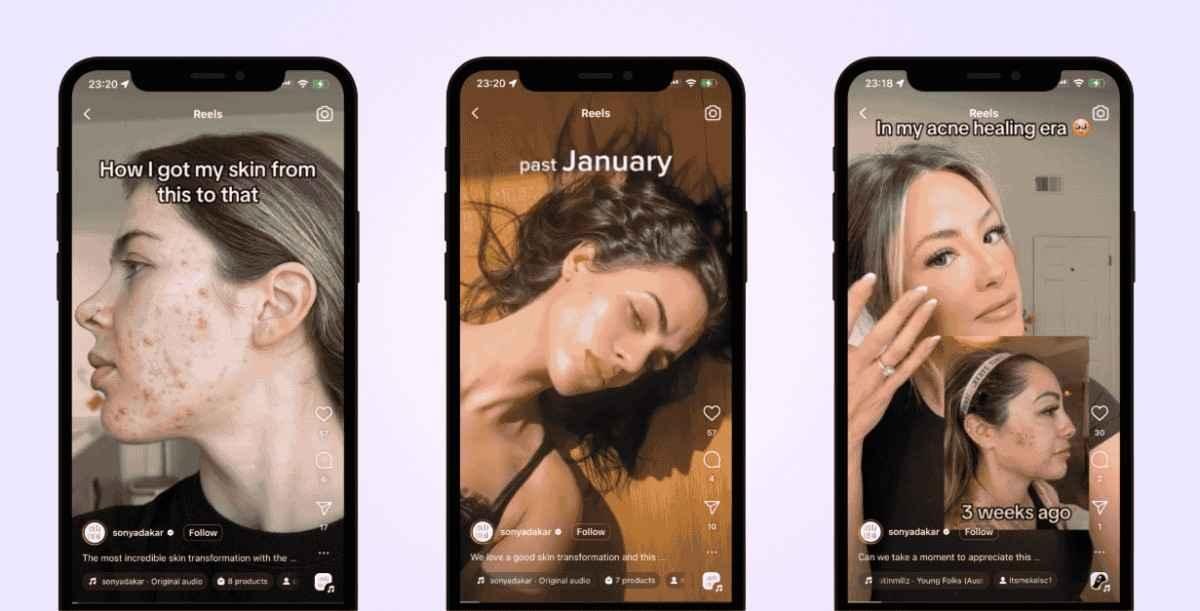
Similarly to Stories, Reels ads appear between organic Reels content. These short-form videos (up to 90 seconds) blend seamlessly with user-generated content.
The key here is making ads that don’t feel like ads – they should entertain first, sell second.
For instance, a makeup brand might use Meta advertising to create a quick transformation video or a trendy tutorial that fits naturally with other Reels content. After all, people go to Reels for entertainment, not traditional advertising.
Messenger ads
Messenger ads offer unique opportunities for direct engagement. These ads can appear in the Messenger home tab or as sponsored messages to people who’ve previously interacted with your business.

People can start conversations with your business right from the ad. A real estate agent could use Messenger ads to generate leads, with interested buyers immediately asking questions about properties.
Lead ads
If you’re looking to collect contact information, lead ads make it incredibly easy. When someone clicks your ad, a form pops up pre-filled with their Facebook contact information. They just need to confirm and submit.
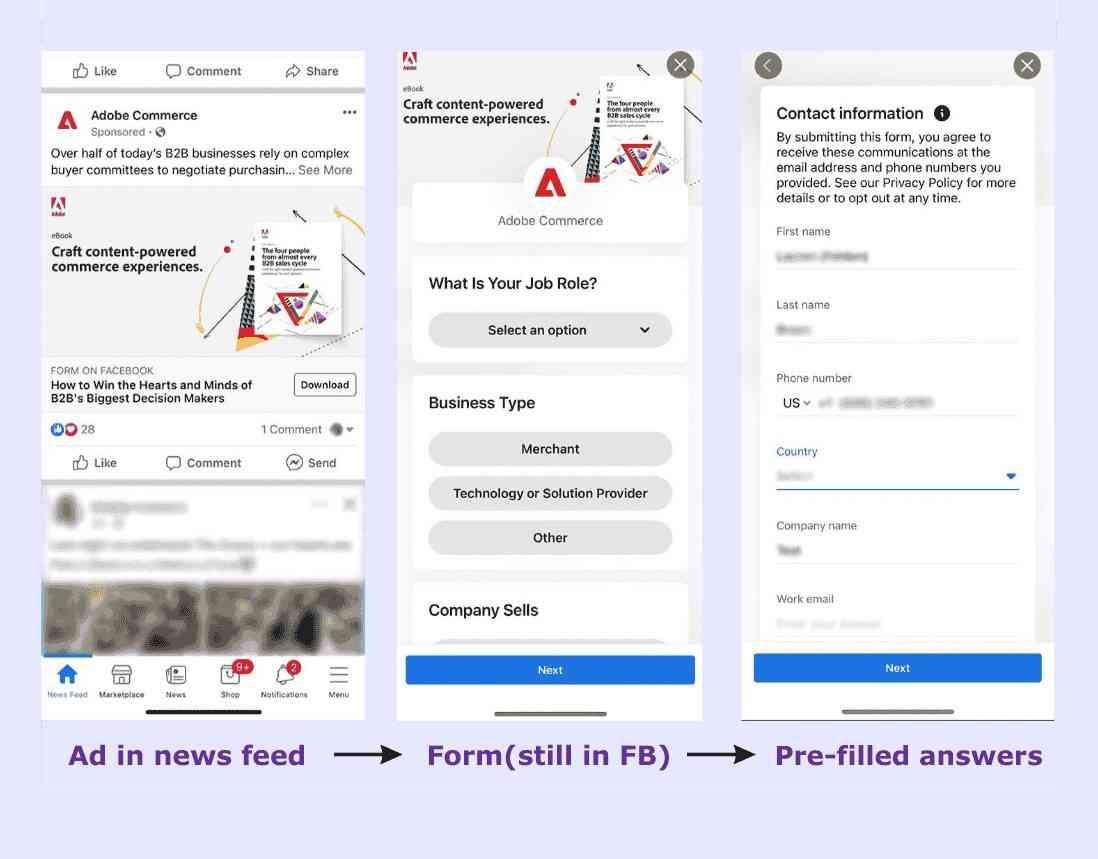
Unfortunately, the trade-off is that these leads might be less qualified since signing up is so easy. Still, for businesses offering free trials, newsletters, or quotes, lead ads can build your email list quickly.
Dynamic ads
Dynamic ads in Meta advertising automatically show relevant products to people based on their previous interactions with your website or app.
Let me guess – you’ve browsed for shoes online and then seen those exact shoes in a Facebook ad? That’s dynamic advertising at work.

These ads pull product information from your catalog and create personalized ads for each viewer. So while you create one ad template, thousands of customers might see different product combinations based on their interests.
Playable ads
For mobile app developers, playable ads let users test your app before downloading. These interactive ads work like mini-games, giving people a taste of your app’s experience.

In fact, these ads often see higher conversion rates because users know exactly what they’re getting.
Choosing the right format
Image ads work for simple messages, videos tell stories, carousels showcase variety, and dynamic ads personalize at scale.
Your choice depends on your goals, budget, and what resonates with your audience. Start meta advertising with one or two formats, test what works, and expand from there.
How to get started with Meta Advertising
After knowing what are Meta Ads, you are ready to launch your first Meta ads campaign. Let’s walk through each step from setting up your account to hitting that publish button. By the end, you’ll know exactly how to get your ads up and running.
Set up your Meta Business account
First of all, you need a Meta Business account to run ads. Head to business.facebook.com and click “Create Account.”
You’ll enter your business name, your name, and your business email. After that, Meta will send a confirmation email – click the link to verify your account.

But wait, there’s an important detail here. You’ll also need to add a Facebook Page to your Business account.
\If you don’t have one yet, you can create it during this process. So, your Meta advertising will show as coming from your business page, not your personal profile.
For more details, check out this post on setting up a Meta Business Manager account.
Access Ads Manager
Once your Business account is ready, you’ll find Ads Manager in your business tools menu. Look, the interface might seem overwhelming at first, but don’t worry – we’ll tackle it step by step.
Ads Manager has three main levels – campaigns, ad sets, and ads. Campaigns contain ad sets, and ad sets contain ads. Why this hierarchy? Because you set different parameters at different levels.

In campaign settings, you decide things like the name of the campaign, goal, and budget. Then, in the ad set, you determine the target audience. So, you can target multiple audiences from the same campaign by having different ad sets.
In Meta advertising, each ad set can then have one or more ads, with each ad having a different graphic and message. This is useful because by running multiple ads for the same type of audience, you can keep testing which ad performs the best.
To learn more, read this guide on how to use Meta Ads Manager.
Choose your campaign objective
So now you’re in Ads Manager. Click “Create” to start a new campaign. Meta will ask what you want to achieve – this is your campaign objective. You’ll see options like Awareness, Traffic, Engagement, Leads, App Promotion, and Sales.

Here’s a simple guide: choose Traffic if you want website visitors, Leads if you’re collecting email addresses, and Sales if you’re selling products online. Your objective tells Meta’s algorithm what success looks like for your campaign.
For more information, check out this post on choosing a Facebook Ad Objective.
Name your campaign and set special categories
Next, give your campaign a clear name you’ll recognize later. For example, “Summer Sale 2024” beats “Campaign 1” any day.
Also, if you’re using Meta advertising to market credit, employment, housing, or social issues, you must declare this in the special ad categories section. Unfortunately, skipping this step when required can get your account restricted.
To learn more, read this post on naming Facebook Ad Campaigns.
Set your budget and schedule
Now for the money talk. You can choose a daily budget (spending up to X amount per day) or a lifetime budget (total amount for the entire campaign). Start small – even $10-20 per day can give you valuable data.
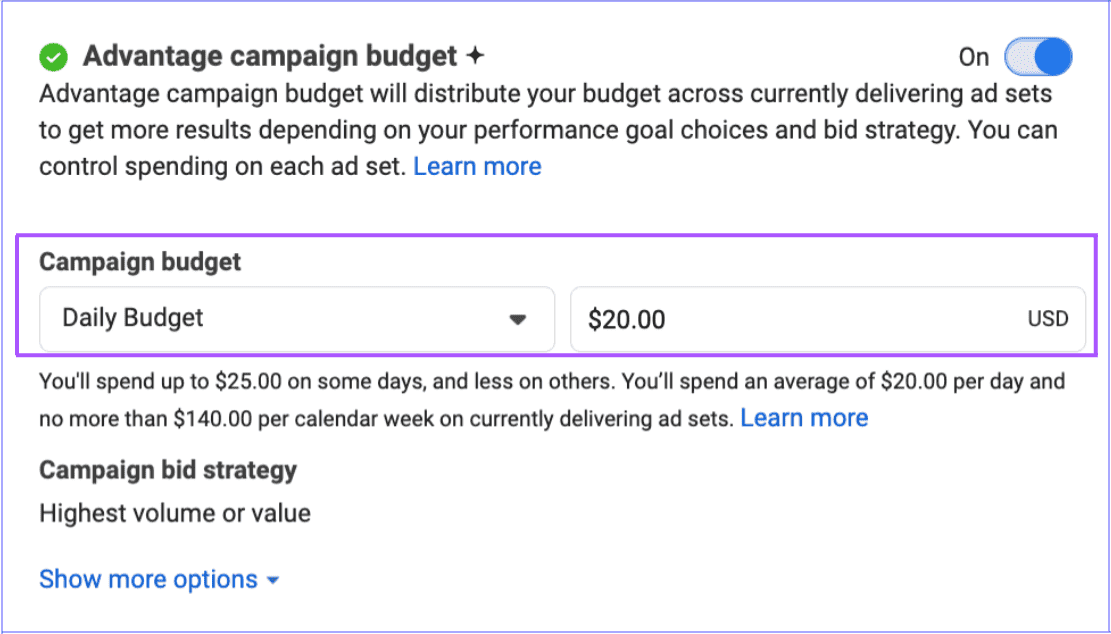
Similarly, you can run ads continuously or set specific start and end dates. For what it’s worth, running ads continuously gives Meta’s algorithm more time to optimize performance.
For more details, read this article on Meta Ads budgeting strategies.
Set up your ad set
Moving to the ad set level in Meta advertising, this is where you define who sees your ads. You can target people by location, age, gender, languages, and detailed targeting like interests and behaviors.

For instance, a yoga studio might target women aged 25-45 within 10 miles who are interested in fitness and wellness.
The best part? You can save audiences to use again later. Besides that, Meta shows an estimated audience size gauge – aim for the green zone, which means your audience isn’t too broad or too narrow.
For more details, check out this post on Meta ad sets.
Choose your placements
Meta can show your ads across Facebook, Instagram, Messenger, and the Audience Network. You can let Meta automatically choose placements or manually select where ads appear.

The automatic route in Meta advertising might seem simpler, but I recommend making a specific selection manually. This way, you can create different ad sets or campaigns for different platforms, making it easier to analyze results from each.
To learn more, read this guide on Facebook ad placements.
Create your actual ad
Finally, the fun part – creating your ad! Then choose your ad format: single image, video, carousel, or collection.
Next, upload your images or videos. Meta recommends using the highest resolution possible – at least 1080 x 1080 pixels for square images. And you know what? You can upload multiple versions and let Meta test which performs best.
You also write your ad copy here. Your primary text appears above the image. Keep it concise and focus on value. The headline appears below your image in bold – make it attention-grabbing.
Finally, add your call-to-action. Pick a button that matches your objective: “Learn More,” “Shop Now,” “Sign Up,” “Contact Us,” and others. This button tells people exactly what to do next.
Review and publish
Still with me? Great! Before publishing your Meta advertising campaign, use the preview tool to see how your ad looks on different placements. Check your targeting, budget, and ad creative one more time.
Once everything looks good, click “Publish.” The only problem? Your ads won’t go live immediately. Meta reviews all ads to ensure they follow advertising policies. This usually takes less than 24 hours.
Final thoughts on Meta Ads
Meta ads offer a practical way to reach potential customers where they already spend time online. You’ve learned what are meta ads, how the platform works, explored different ad formats, and discovered the steps to launch your first campaign.
The key is starting simple – pick one objective, create one ad, and learn from the results.
Remember, successful Meta advertising isn’t about perfection on your first try. It’s about testing different approaches, understanding what resonates with your audience, and gradually improving your results.
Start with a small budget, track your performance, and adjust based on data rather than guesswork.
With billions of users across Facebook and Instagram, Meta ads can help you find the right people for your business. Take what you’ve learned here and put it into action.
Did I miss anything? Did you try these tips? Do you have any questions or comments? Share your thoughts below in the comments section.