
You just promoted a fitness course and earned $500 in commissions. But here’s the problem: you have no idea which traffic source brought those sales.
Was it your YouTube video, Instagram post, or email campaign? Without properly tracking your affiliate marketing efforts, you’re flying blind.
This happens to most affiliate marketers. You see money coming in but can’t pinpoint what’s actually working. You might be doubling down on the wrong strategies while ignoring your biggest winners.
The solution lies in understanding your data. But most people don’t know where to start or what numbers actually matter. That’s why in this post, I’ll discuss all you need to know about affiliate marketing analytics.
Disclaimer: If you buy any products through links on this site, I may earn a commission. But it doesn't make any difference to your cost, and it helps me keep this blog running. So you could always read my articles for free.
What is affiliate marketing analytics?
Affiliate marketing analytics is the process of tracking and measuring your performance as an affiliate marketer. In simple terms, it means collecting data about your campaigns to see what’s working and what isn’t.
Think of it like keeping score in a game. You track numbers like clicks, conversions, revenue, and costs.
For example, if you promote a software tool through your blog, analytics shows you how many people clicked your link, how many actually bought the product, and how much commission you earned.
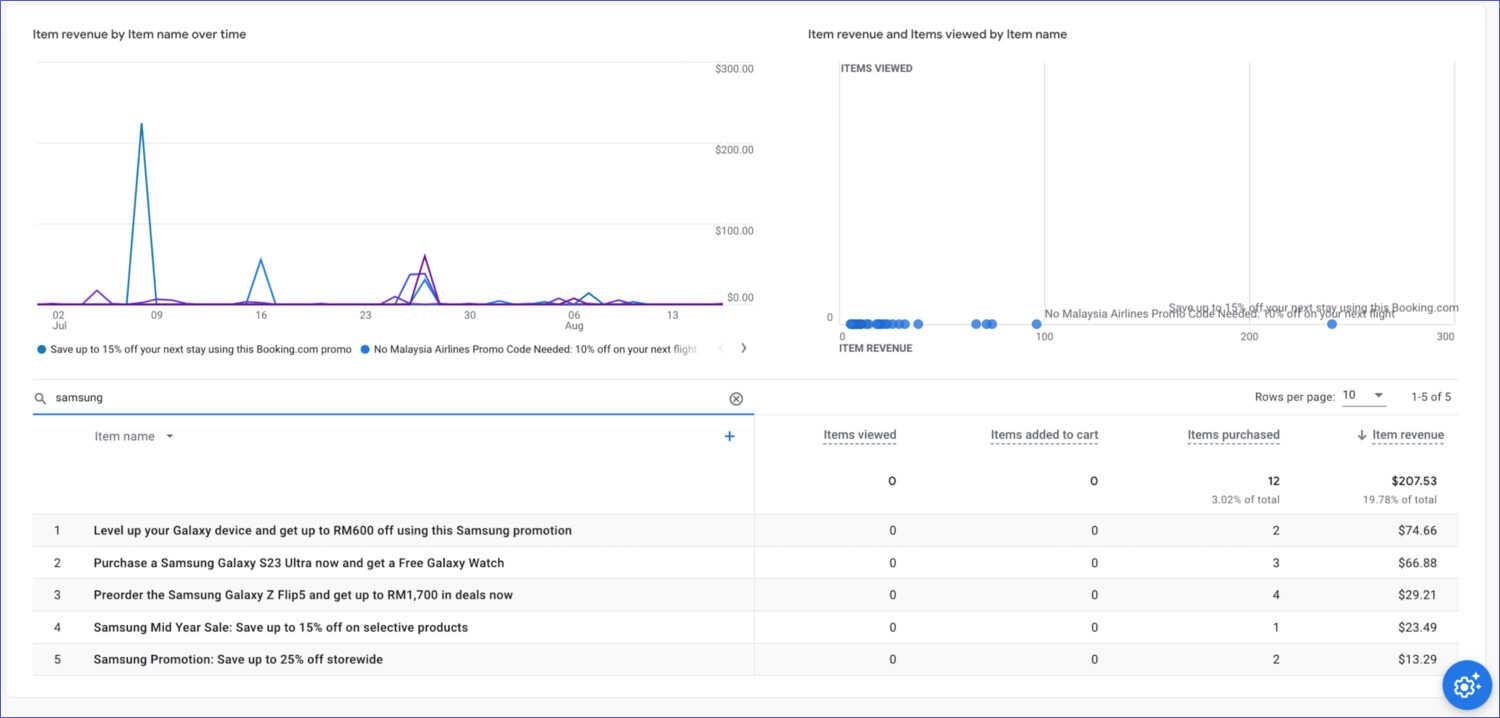
Here’s what makes this different from basic tracking: analytics goes deeper than just counting clicks. It reveals patterns and insights about your audience behavior.
Besides that, tracking affiliate marketing campaigns helps you understand which traffic sources bring the best customers, what content converts most effectively, and when people are most likely to buy.
The data typically includes metrics like click-through rates, conversion rates, average order values, and customer lifetime value.
Take the case of email marketing versus social media promotion—analytics might show that email generates fewer clicks but higher-value customers.
Most importantly, affiliate marketing analytics helps you make informed decisions instead of guessing. Rather than spending time on content that doesn’t convert, you can focus your efforts on proven winners.
This data-driven approach means you stop wasting money on ads that don’t work and double down on strategies that actually generate profit.
Without analytics, you’re essentially throwing darts in the dark and hoping something sticks.
Why track your affiliate marketing performance?
You can’t improve what you don’t measure. Tracking your affiliate marketing performance gives you the power to make smart business decisions instead of guessing what works. Without data, you’re essentially gambling with your time and money.
Find your profit makers
When you measure affiliate marketing performance, it reveals which campaigns actually make money. For example, you might discover that your Instagram posts generate lots of clicks but few sales, while your email newsletter has fewer clicks but higher conversions.
This insight helps you focus on activities that bring real results.
You can use tools for tracking performance, such as Social Status – an Instagram analytics tool that helps you see how your account is doing, who your audience is, and what content they connect with.
It lets you track performance across posts, Stories, and ads so you can better understand your followers and curate your post that truly clicks with them.
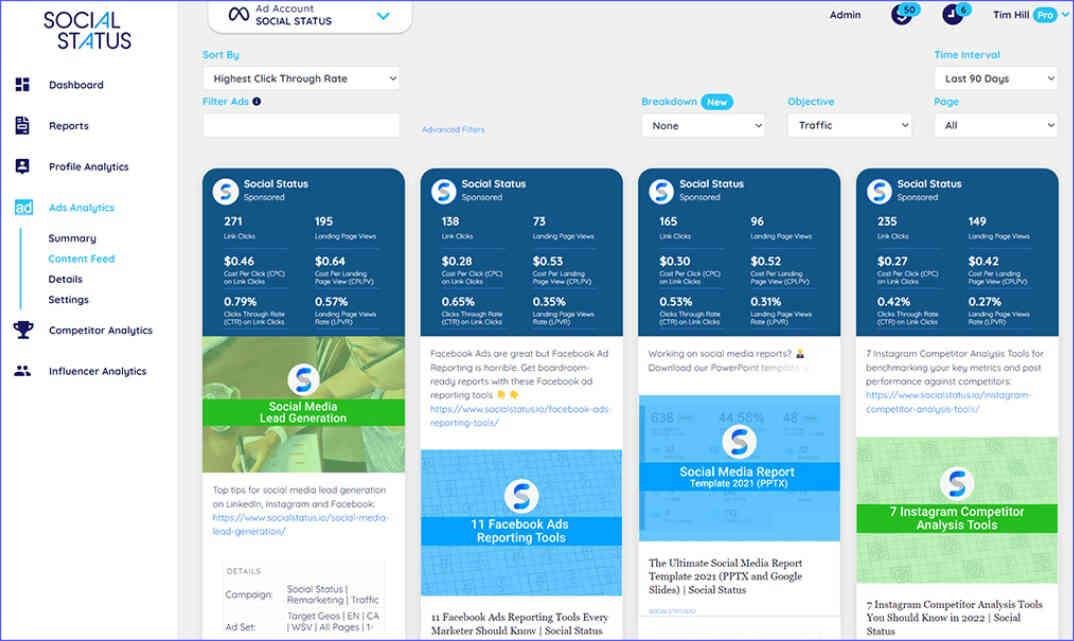
Besides that, when you track affiliate marketing campaigns, it shows you the cost of acquiring each customer. If you spend $50 on ads to earn $30 in commissions, you’re losing money. However, if another campaign costs $20 and earns $100, you know where to invest more.
Understand your audience better
Affiliate marketing analytics reveal patterns about your customers’ behavior. Take the case of timing—you might find that people buy more on weekends or during specific hours.
This knowledge helps you schedule your content and promotions for maximum impact.
Furthermore, when you track affiliate marketing metrics, they show which products resonate with your audience. If fitness supplements consistently outperform diet books, you can adjust your content strategy accordingly.
Scale what works
Once you identify successful campaigns, tracking helps you replicate and expand them. Here’s how it works: if a particular blog post generates consistent commissions, you can create similar content or promote it more heavily.
Additionally, affiliate marketing performance data helps you negotiate better deals with merchants. When you can prove that you drive high-quality traffic and sales, you gain leverage to request higher commission rates or exclusive offers.
The bottom line is simple: affiliate marketing analytics turns guesswork into a data-driven business strategy.
How to measure affiliate marketing
The foundation of measuring affiliate marketing lies in using proper tracking links for every promotion. Instead of sharing bare affiliate URLs, you need links that capture detailed data about each click and conversion.
Most affiliate networks provide built-in tracking, but you can enhance this with URL shorteners like Bitly or Pretty Links. For example, instead of posting a long Amazon affiliate link, you create a branded short link like “yoursite.com/fitness-tracker.”
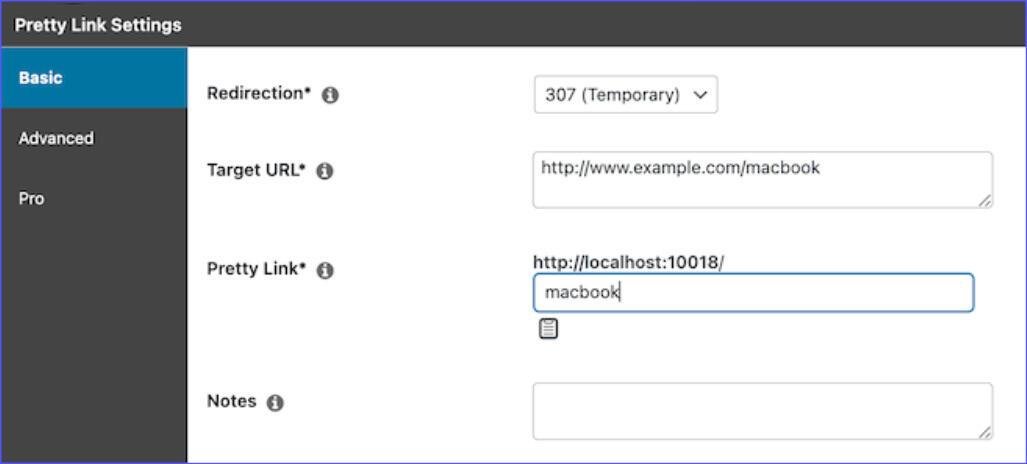
This approach lets you track clicks across different platforms while keeping your links clean and professional.
Here’s how to set this up: create unique affiliate marketing tracking codes for each traffic source. If you promote the same product on Instagram, your blog, and email, use different tracking parameters for each.
This way, you can see that Instagram generated 150 clicks with 3 sales, while your blog post got 50 clicks but 8 sales.
However, using tracking codes or a dashboard provided by a merchant may still not give you key information. For example, the affiliate marketing analytics may tell you how many clicks you got from Instagram, but not how many conversions were specifically from Instagram.
If your merchant or affiliate platform doesn’t provide you enough data on which of your traffic sources are converting the most, the best you can do is to see where the merchant itself is investing heavily. For example, do they focus more on Instagram, Email, or YouTube?
Monitor key performance indicators
Once your tracking is in place, focus on metrics that actually matter for your bottom line. Click-through rate tells you how compelling your content is, while the conversion rate shows how well your audience matches the product.
Take the case of a tech blogger who promotes productivity software through affiliate links.
She discovered through affiliate marketing analytics that her YouTube reviews had a 12% click-through rate but only 1.2% conversion rate. Meanwhile, her email newsletter reviews achieved 8% clicks but 6% conversions.
This data revealed that video viewers were curious but not ready to buy, while email subscribers were serious prospects.
Besides that, when you track your affiliate marketing campaign, you should track your earnings per click (EPC). Calculate this by dividing total commissions by total clicks.
If you earned $500 from 1,000 clicks, your EPC is $0.50. This metric helps you compare the value of different traffic sources and content types.
To learn more, read this post on affiliate marketing metrics and KPIs.
Use analytics platforms effectively
Google Analytics provides deeper insights when you set up goal tracking for affiliate conversions. Connect your affiliate links to specific goals, then track affiliate marketing metrics to analyze which pages and traffic sources drive the most valuable visitors.
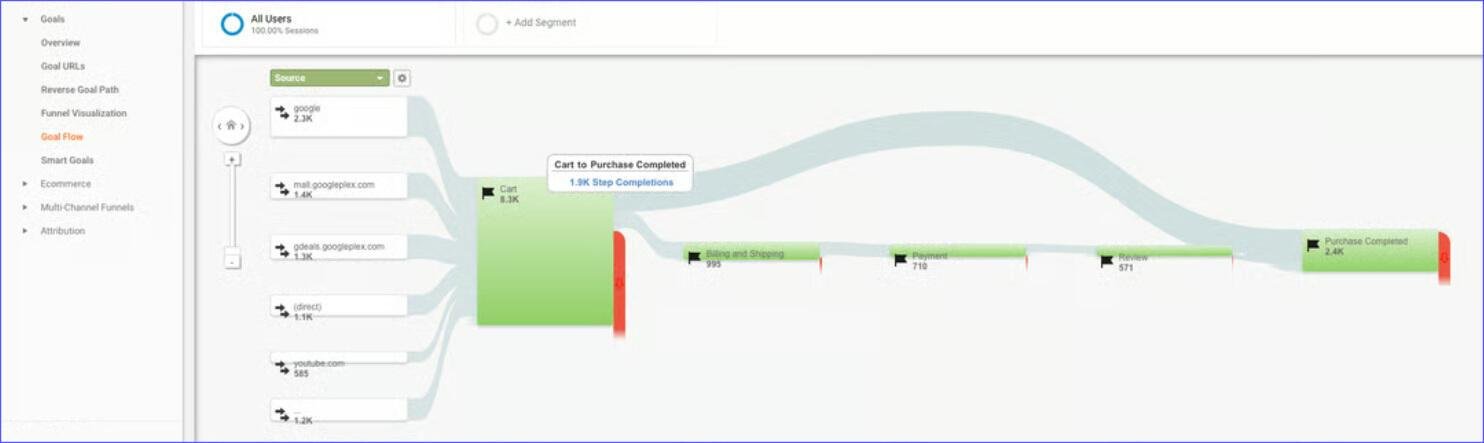
For instance, a lifestyle affiliate who promotes home goods found that visitors from Pinterest spent an average of 4 minutes on her product review pages and clicked her affiliate links 15% of the time.
However, Facebook traffic spent only 1.5 minutes and clicked at 3%. This insight led her to focus more effort on Pinterest content.
Furthermore, most affiliate networks offer their own analytics dashboards. Amazon Associates, for example, provides an affiliate marketing analytics dashboard that shows you which products you’re promoting perform best and during what time periods.
A food blogger promoting kitchen gadgets tracked her affiliate marketing campaign to discover her air fryer affiliate links peaked every Sunday evening, allowing her to schedule social media posts accordingly.
The key is connecting all these data points to understand your complete customer journey from first click to final purchase.
For more information, check out this post on the affiliate marketing tracking tool.
Best analytics tools to track affiliate marketing
Here’s a list of tools I recommend when it comes to monitoring the effectiveness of your affiliate marketing campaigns.
Google Analytics
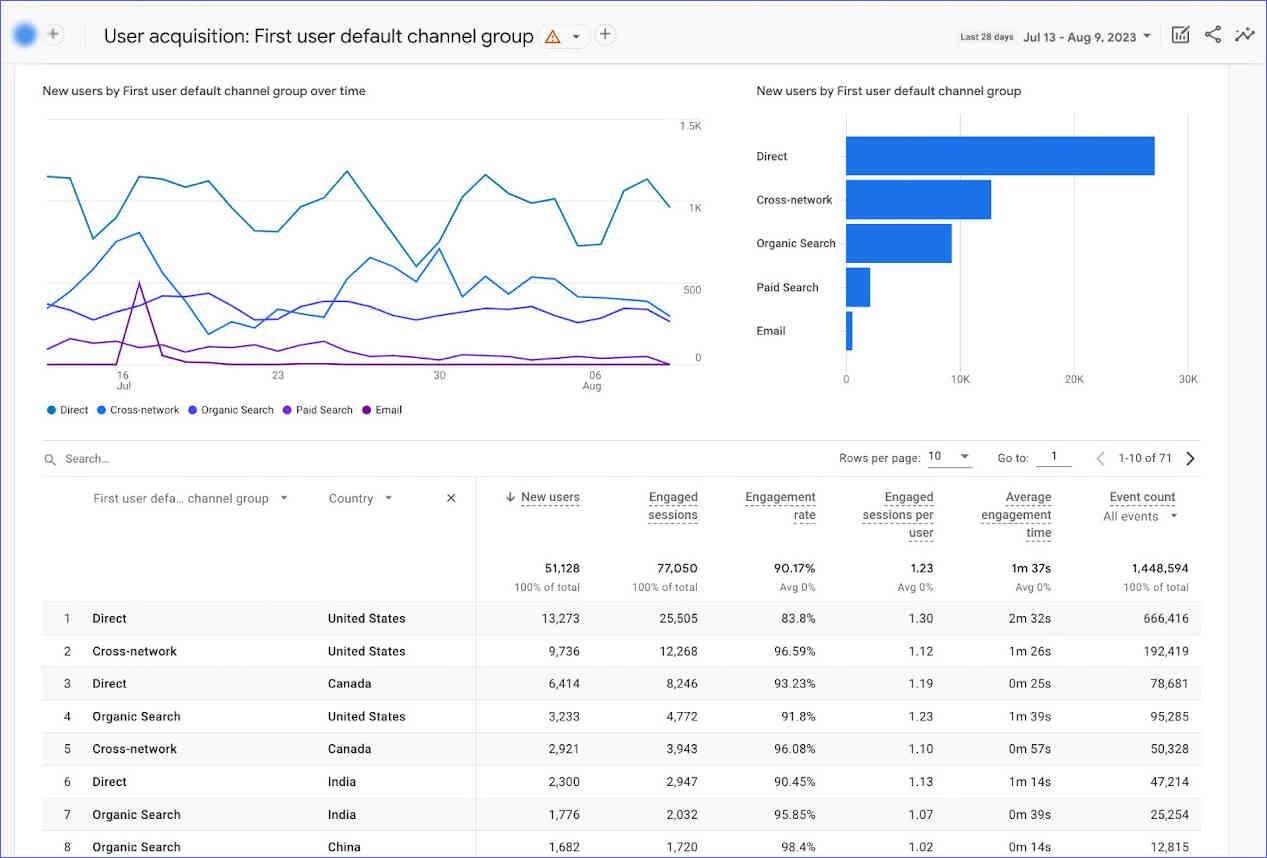
Google Analytics remains the backbone of tracking affiliate marketing performance. You can monitor which pages generate the most affiliate clicks, track visitor behavior on your site, and see which traffic sources bring the highest-converting audience. The platform connects your content performance directly to your affiliate success.
Key features:
- Goal tracking for affiliate link clicks
- Traffic source analysis
- Audience behavior insights
- Custom campaign tracking with UTM parameters
- Real-time visitor monitoring
Pros:
- Completely free to use
- Integrates with most platforms
- Detailed audience demographics
- Custom reporting options
Cons:
- Steep learning curve for beginners
- Cannot track conversions after visitors leave your site
- Complex interface can be overwhelming
- Requires technical setup for advanced features
My verdict: Essential free tool for tracking your own site’s affiliate performance, but expect a learning period.
Bitly
Bitly is a great tool that can help you measure an affiliate marketing campaign’s success. It simplifies link tracking by creating shortened URLs that capture click data. You can organize affiliate links by campaign, see geographic click data, and compare performance across different promotional channels.
By allowing you to track affiliate marketing links, this tool bridges the gap between your content and affiliate network analytics.

Key features:
- Click tracking and analytics
- Custom branded short links
- Geographic click data
- Link organization by campaigns
- QR code generation for offline promotions
Pros:
- Simple setup and user-friendly interface
- Works across all platforms and channels
- Provides click timing and location data
- Free tier available
Cons:
- Limited conversion tracking capabilities
- Premium features require paid subscription
- Cannot track post-click merchant behavior
- Basic reporting compared to specialized tools
My verdict: Perfect starter tool to track affiliate marketing for links, especially useful for social media affiliate promotions.
Pretty Links (WordPress plugin)
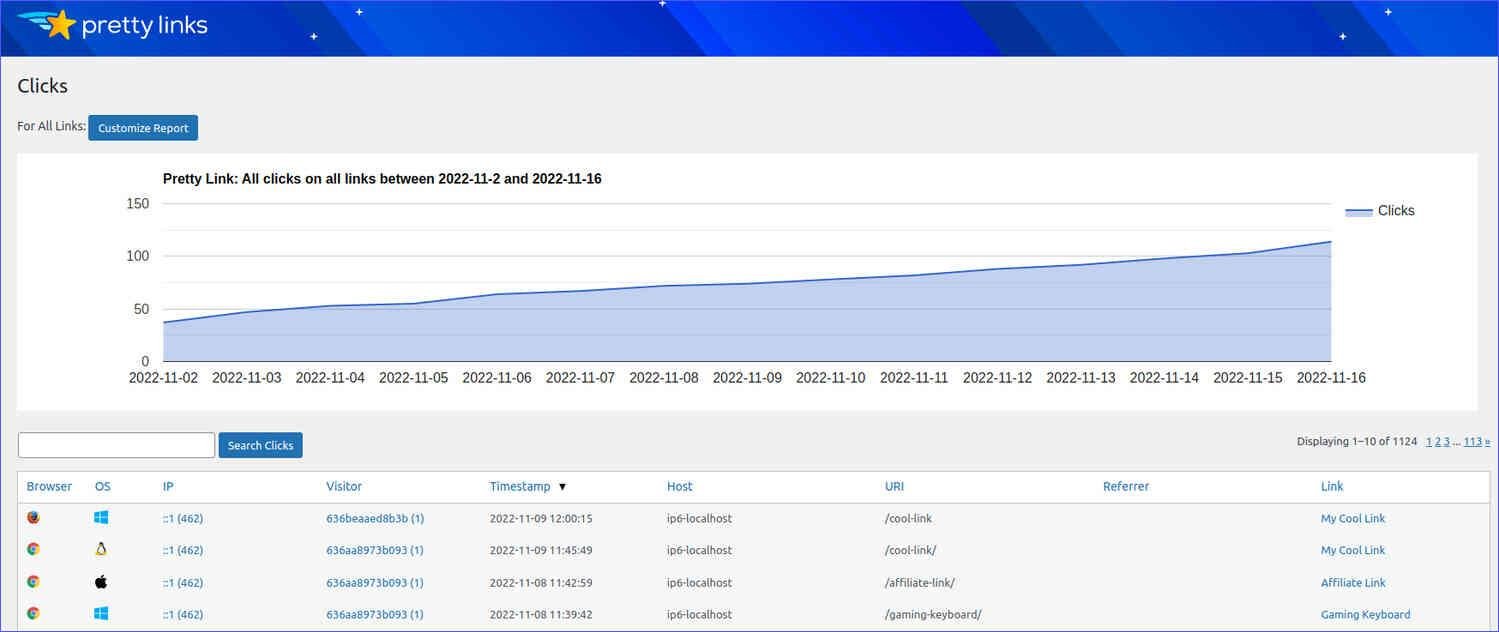
Pretty Links transforms ugly affiliate URLs into clean, branded links while providing comprehensive tracking. You can cloak affiliate links, prevent commission theft, and organize all your promotional links from one dashboard.
This WordPress-specific solution works seamlessly with your existing site and can help you with your affiliate marketing analytics.
Key features:
- Link cloaking and redirection
- Click tracking and reporting
- Automatic link replacement
- Geographic and device tracking
- A/B testing capabilities
Pros:
- Integrates directly with WordPress
- Professional-looking branded links
- Prevents affiliate link theft
- Built-in split testing features
Cons:
- Only works with WordPress sites
- Premium version required for advanced features
- Learning curve for complex campaigns
- Limited integration with external platforms
My verdict: Best WordPress solution for affiliate link management. Worth the investment for serious bloggers in need of a tool to track affiliate marketing campaigns.
ThirstyAffiliates
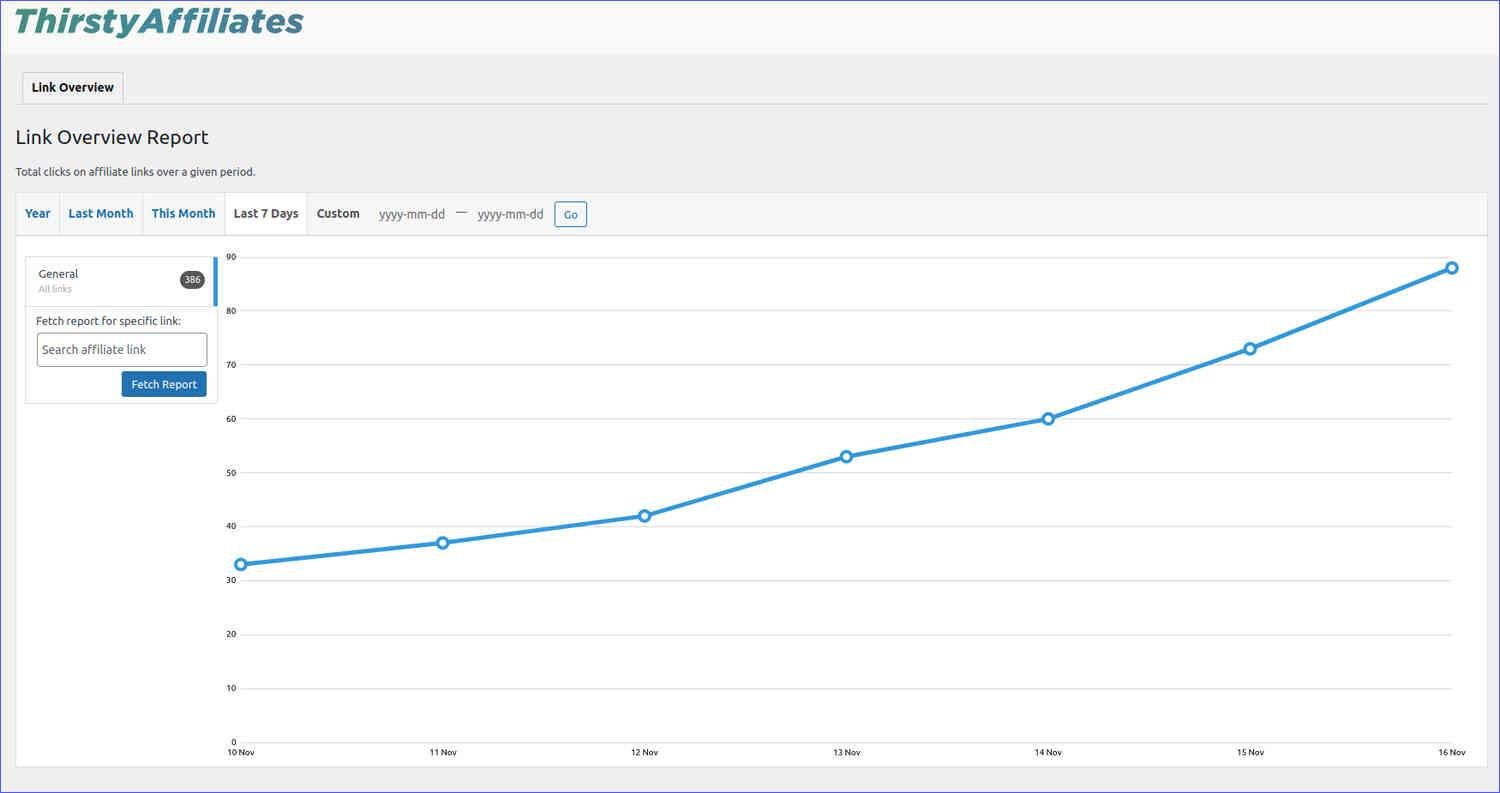
ThirstyAffiliates specializes in affiliate link management with robust tracking capabilities. You can automatically insert affiliate links into old posts, track link performance, and organize thousands of affiliate relationships. The plugin focuses specifically on affiliate marketing needs rather than general link tracking.
Key features:
- Automatic link insertion
- Link performance analytics
- CSV import/export functionality
- Link health monitoring
- Geolocation-based redirects
Pros:
- Built specifically for affiliate marketers
- Automatic link management saves time
- Comprehensive affiliate-focused reporting
- Link rot detection and alerts
Cons:
- WordPress-only solution
- Premium pricing for full features
- Can slow down site if overused
- Limited integration with non-WordPress platforms
My verdict: Comprehensive affiliate-specific solution for WordPress users managing multiple programs and high link volumes.
Key affiliate marketing performance metrics
If you want to track affiliate marketing performance, here are the most important KPIs you should keep tabs on in your journey.
Click-through rate
Click-through rate (CTR) measures how many people click your affiliate links compared to how many see them. You calculate this by dividing total clicks by total impressions, then multiplying by 100.
For example, if 1,000 people see your blog post and 50 click your affiliate link, your CTR is 5%.
This metric is a crucial part of affiliate marketing analytics and can reveal how compelling your content and call-to-action are. A low CTR might mean your audience isn’t interested in the product, or your promotional copy needs improvement.
However, CTR alone doesn’t tell the complete story since clicks don’t always equal sales.
Here is something you may notice while tracking your affiliate marketing efforts: different platforms typically see different CTR ranges. Email newsletters often achieve 2-5% CTR, while social media posts might get 0.5-2%.
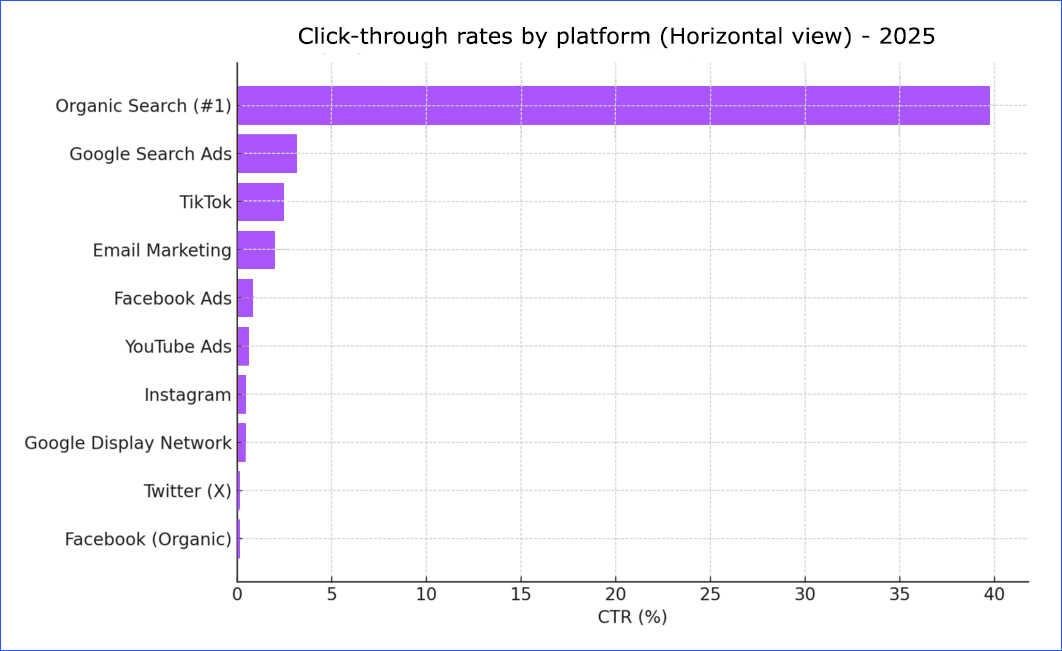
Understanding these benchmarks before measuring affiliate marketing efforts helps you set realistic expectations and identify when performance is unusually high or low.
Conversion rate
Conversion rate shows what percentage of your clicks turn into actual sales. You get this number from your affiliate network dashboard by dividing sales by clicks. If you sent 100 clicks to a merchant and generated 3 sales, your conversion rate is 3%.
This metric matters more than CTR for your bottom line, especially in affiliate marketing analytics. You might have a high CTR but low conversion rate, which means you’re driving curious visitors who aren’t ready to buy. Alternatively, a lower CTR with high conversion rate suggests you’re attracting serious buyers.
Several factors affect conversion rates beyond your control. The merchant’s website quality, product price, and checkout process all influence whether your referrals complete purchases.
That’s why tracking this metric across different affiliate programs helps you identify which merchants convert your traffic best.
Earnings per click
Earnings per click (EPC) combines your click volume with actual revenue to show the real value of your traffic. Calculate EPC by dividing total commissions by total clicks. If you earned $200 from 500 clicks, your EPC is $0.40.
In affiliate marketing analytics, this metric helps you compare different promotional strategies and products objectively. A high-priced product with low conversion might still deliver better EPC than a cheap product with high conversion.
For instance, promoting a $500 software tool that converts at 2% generates more per click than a $20 book that converts at 10%.
Furthermore, when you track affiliate marketing metrics like EPC, it helps you prioritize your time and effort. If one piece of content consistently generates $0.50 EPC while another only achieves $0.10, you know where to focus your promotional energy.
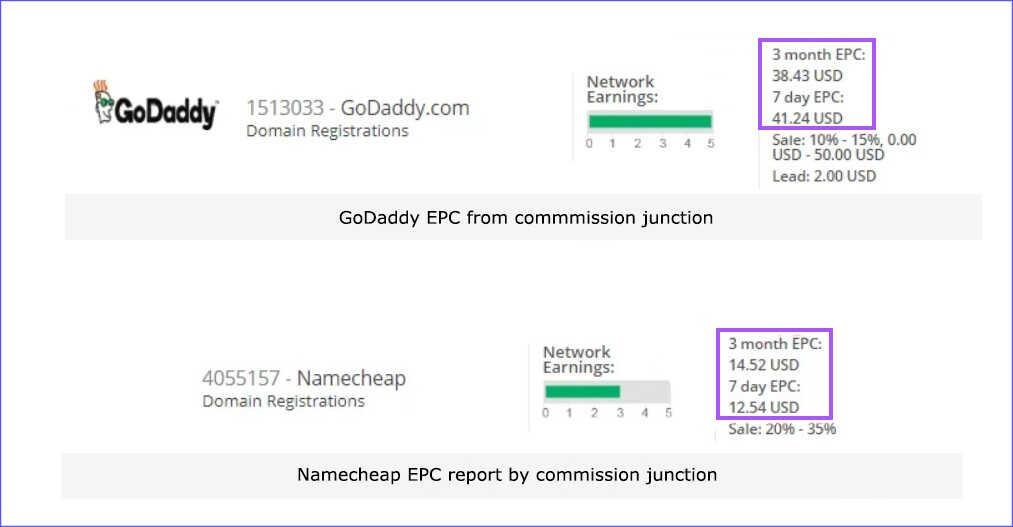
For example, if you look at the 90-day earnings-per-click for Namecheap versus GoDaddy, you’ll notice that GoDaddy’s figure is nearly three times higher. The same threefold difference appears in the 7-day EPC as well.
This means GoDaddy delivers notably strong earnings per click. Affiliates receive about $38.43 for every 100 visits, which is quite solid. Overall, GoDaddy stands out as the more favorable platform to advertise.
The key is tracking these metrics consistently across all your campaigns to identify patterns and optimize your strategy accordingly.
Final thoughts on affiliate marketing analytics
Affiliate marketing analytics transforms guesswork into informed decision-making. You now understand that tracking your affiliate marketing performance means more than just counting clicks—it’s about measuring what actually drives revenue and optimizing accordingly.
The tools and metrics covered here give you a clear roadmap for monitoring your affiliate campaigns. Whether you choose Google Analytics for comprehensive site tracking or specialized tools like ThirstyAffiliates for link management, the key is consistent measurement across all your promotional efforts.
Remember that analytics only work when you act on the insights they provide. Use your CTR data to improve content appeal, leverage conversion rates to identify your best-performing merchants, and calculate EPC to prioritize high-value opportunities.
Start with basic tracking today, then gradually add more sophisticated measurement as your affiliate business grows. Data-driven decisions will always outperform random promotional tactics.
Did I miss anything? Did you try these tips to measure your affiliate marketing campaign? Do you have any questions or comments? Share your thoughts below in the comments section.